Every time you go online you leave traces. Some are obvious: a photo you post, a review you write. Most aren’t. As a page loads, it can quietly hand details about you to dozens of companies you’ve never heard of. Together, all of that is your digital footprint. Here’s what it is, what it’s made of, how big it really is, and how to see and reduce yours.
What is a digital footprint?
A digital footprint is all the information about you that exists online because of what you do there. It builds up over time, it’s hard to erase, and much of it is held by companies rather than by you. It comes in two kinds.
| Active footprint | Passive footprint | |
|---|---|---|
| What it is | Things you share on purpose | Things collected about you, often without you noticing |
| Examples | Social media posts, photos, comments, reviews, emails, forms you fill in, accounts you sign up for | Cookies, tracking pixels, your IP address and rough location, the device and browser you use, pages you visit and how long you stay, search terms |
| Who controls it | Mostly you: you can delete or edit much of it | Mostly companies: ad networks, analytics firms and data brokers |
| Can you see it? | Yes, it’s on your profiles | Not without a tool that shows it |
Digital footprint examples
Active
- Posting a holiday photo, which may include where it was taken.
- Leaving a product review under your name.
- Signing up for a newsletter or an online shop with your email address.
- Your public profiles on social media, LinkedIn or gaming sites.
Passive
- Reading a news article while 40 ad and data companies record the visit.
- Looking at a pair of trainers, then seeing ads for them on other sites the next day (that’s retargeting).
- A website recording your clicks and scrolling so it can replay your visit later (session recording).
- Your browser’s settings, screen and fonts being used to recognise your device without any cookie (fingerprinting).
- Data brokers matching your browsing to an ID so you can be recognised across different sites and devices.
How big is your passive footprint?
This is the part most explainers skip, because it’s invisible. We measured it. The Browser Monster Index opens popular UK websites in a fresh browser and records every tracking company that loads. On the homepage alone, before you’ve read a single article:
12.7
tracking companies on the average site
57%
of sites tracked visitors before they could say no
41%
of sites loaded a data broker (57 of 138)
36%
of sites ran device-fingerprinting scripts (50 of 138)
Your data doesn’t stay in the UK either. On the average site, tracking requests went to servers in about 5 countries, most often Ireland, the United States, the UK, Canada and Germany. Visit ten sites in an evening and your passive footprint may have reached well over 50 companies.
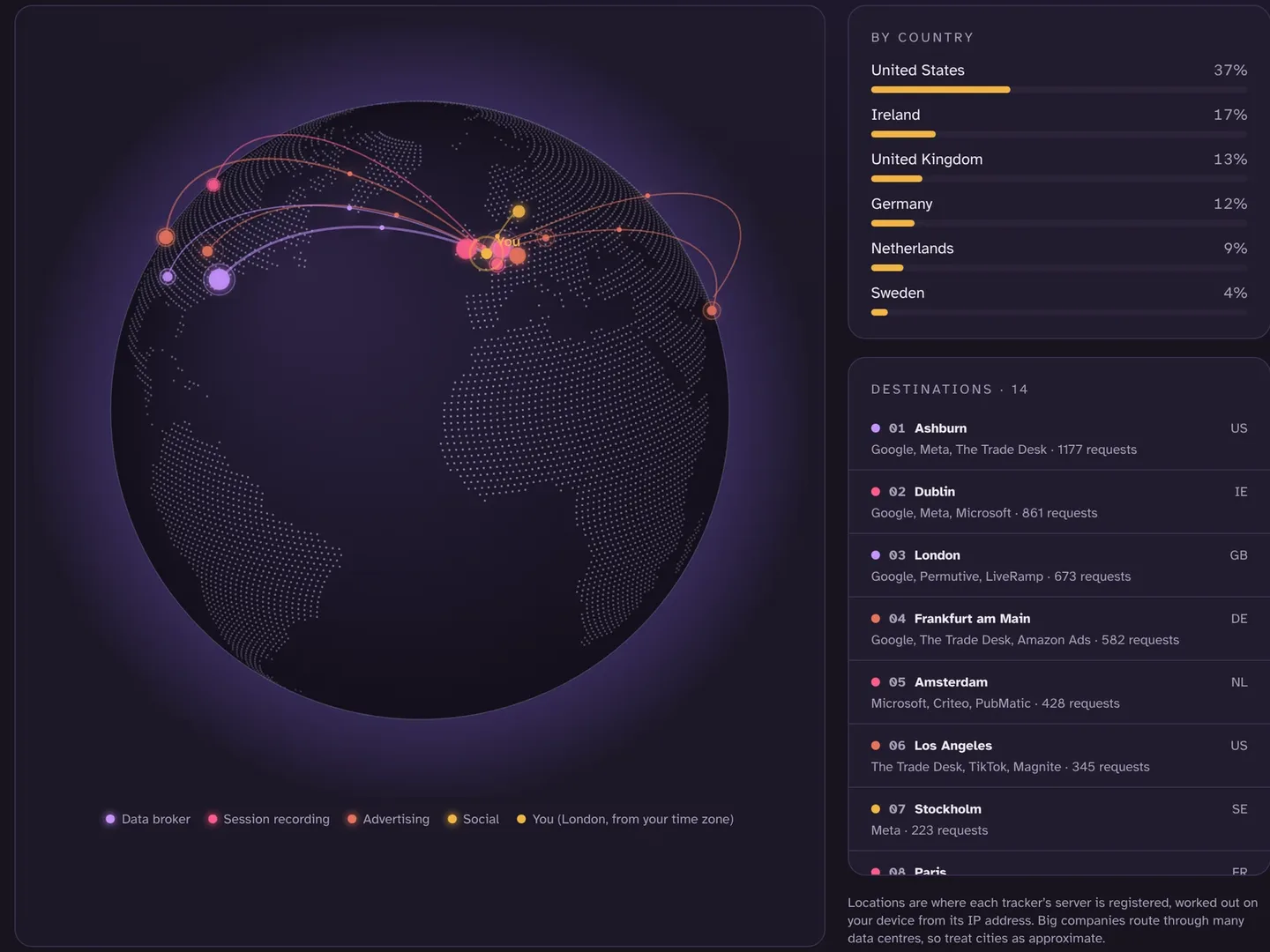
What companies learn from your footprint
Ad companies rarely know your name. They don’t need to. From the sites you visit, the time of day you browse and what you look at, they build a profile: your likely interests, life stage, location and whether you’re about to buy something. That profile decides which ads you see and what you may be offered, and it can be sold on.
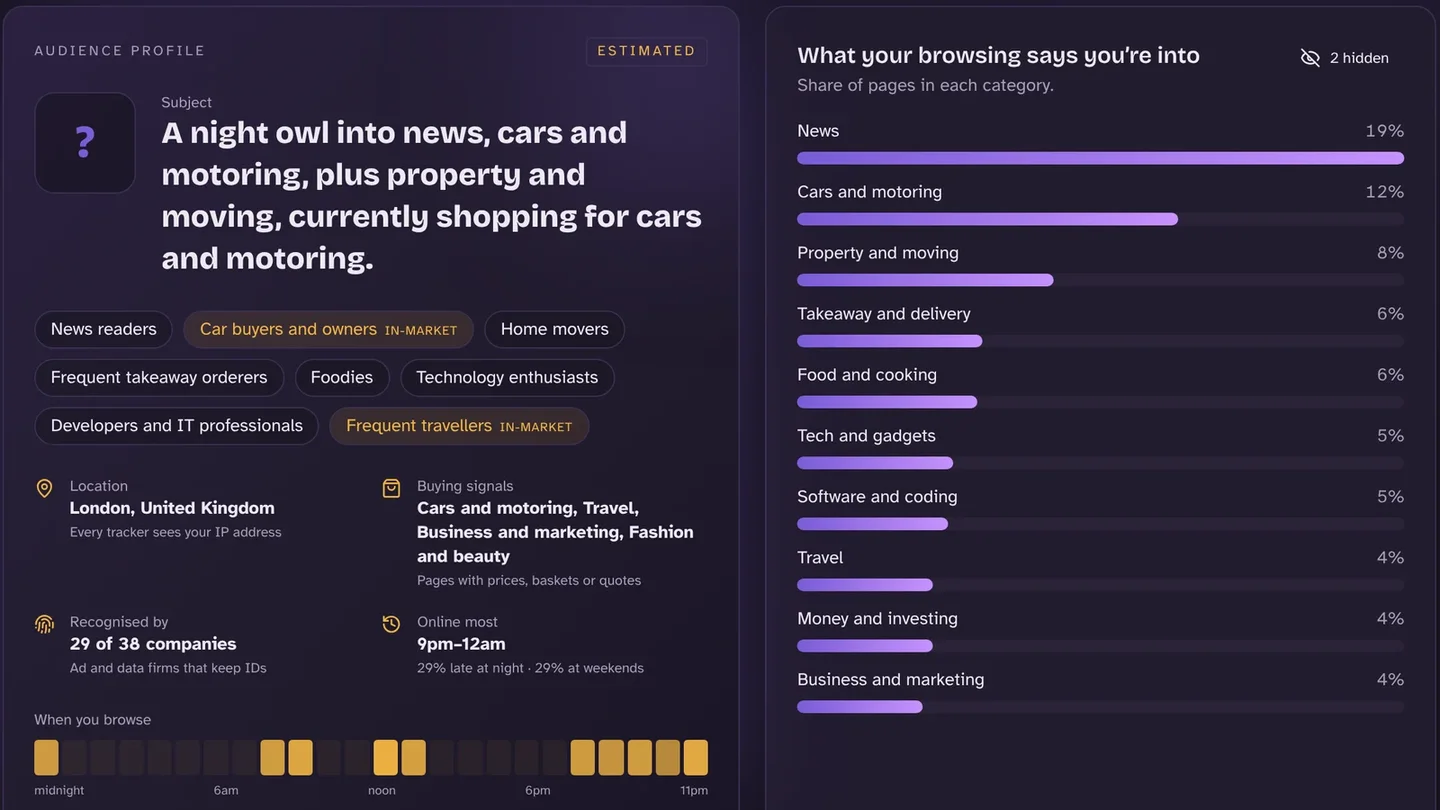
Why your digital footprint matters
- It’s permanent-ish. Posts get screenshotted and archived; data held by companies can be kept for years.
- It’s used to judge you. Employers, universities and landlords may look you up. Ad profiles shape the prices and offers you see.
- It can reveal sensitive things. Browsing about health, money worries or relationships can end up as an interest category.
- It helps scammers. Public details such as your birthday, pet’s name or school make phishing and password guessing easier.
How to check your digital footprint
- Search yourself. Search your name (in quotes), usernames and email address. Check image results too.
- Review your accounts. Make old posts private or delete them, and close accounts you no longer use.
- Check a website before you use it. Look it up on Check a site to see which companies it loads before and after you reject cookies.
- Look up unfamiliar names. If you see a domain like doubleclick.net or bat.bing.com, our tracker lookup tells you who owns it and what it does.
- See it live as you browse. The Browser Monster extension shows the trackers on every page, where your data goes and the profile it adds up to, all worked out on your own device.
How to reduce your digital footprint
- Say no to cookies, every time. Click “Reject all”, or have it done automatically. Be aware that some sites keep tracking after you reject.
- Block third-party cookies in Chrome. Settings → Privacy and security → Third-party cookies.
- Clear tracking cookies regularly. Or clear them by company, so you keep the logins you want.
- Turn off ad personalisation. Google, Meta, Microsoft and others let you switch it off in their ad settings.
- Share less by default. Use a separate email for sign-ups, don’t post your location in real time, and make profiles private.
- Ask what companies hold. Under UK GDPR you can ask any company for a copy of your data (a subject access request) and ask them to delete it.
- Remove yourself from data brokers. Many let you opt out of having your details sold.
For teachers and parents
Quick answers
Can you delete your digital footprint completely?
No. You can delete posts and accounts and ask companies to erase your data, but copies, archives and data already shared with partners are hard to reach. The realistic goal is to shrink it and stop it growing.
Does incognito mode stop your digital footprint?
Only partly. Incognito stops your own browser keeping history and cookies after you close the window. Websites, trackers and your internet provider can still see your visits while it’s open.
Is a digital footprint always bad?
No. A positive active footprint, such as a good portfolio or professional profile, can help you. The problem is the passive part you didn’t choose and can’t see.
See your digital footprint
Browser Monster shows who’s watching on every page, where your data goes and the profile it adds up to, and helps you clear it. Free, and everything stays on your device.
Sources
- Browser Monster Index: live data and dashboard · Browser Monster, October 2026
- How the Browser Monster Index checks websites · Browser Monster
- Your right of access (subject access requests) · Information Commissioner’s Office
- Cookies and how to manage them · Information Commissioner’s Office