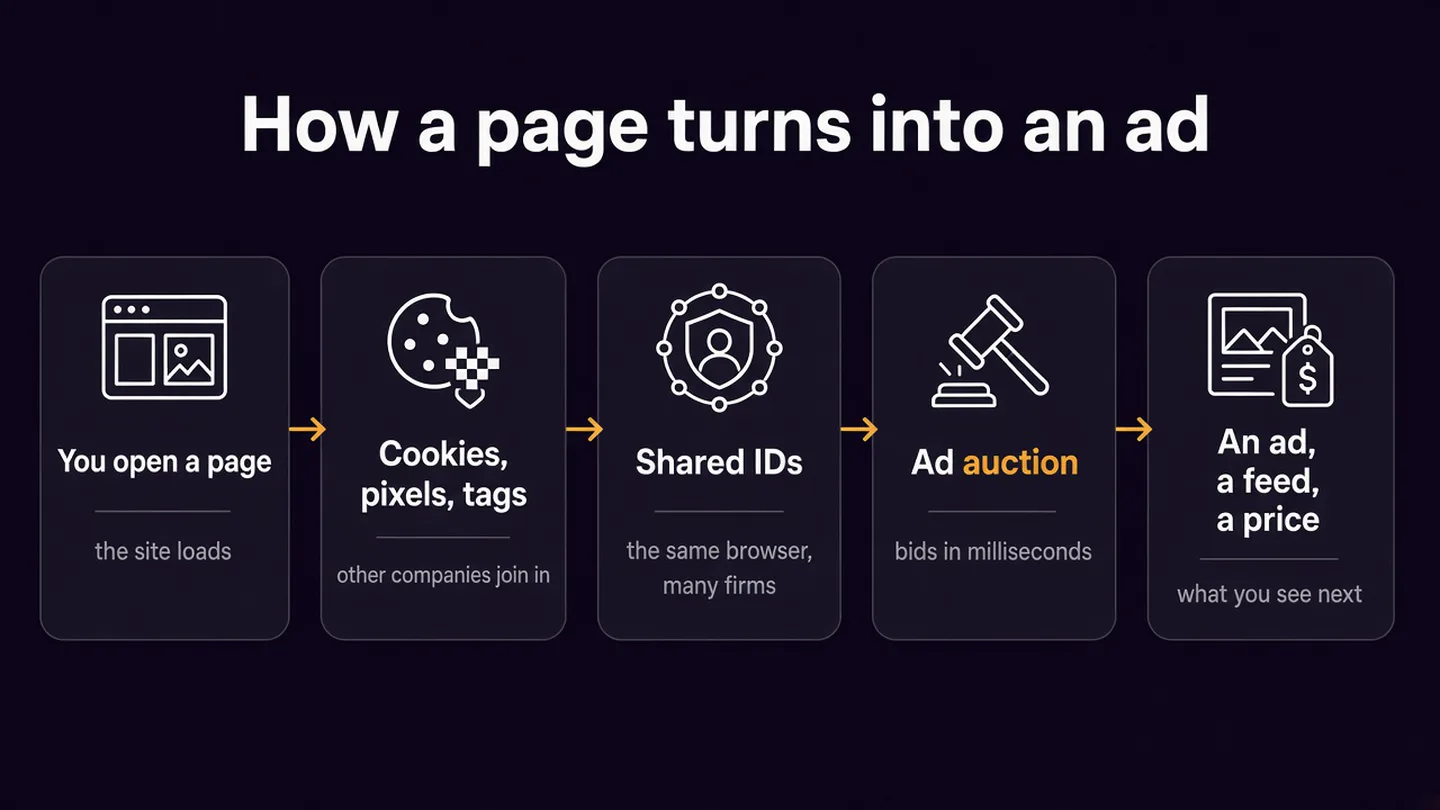
Open a news article and you are not only talking to the newspaper. The page can call in ad exchanges, measurement firms and data companies, and each one can try to recognise the browser in front of it. They rarely need your name. An ID in a cookie, a hashed email, or a fingerprint of the device is enough to attach this visit to the last one.
Those visits become a profile, and that profile is what an ad auction or a recommendation feed consults before you see an ad, a video or a product. This is that chain, in the order it happens. Browser Monster is a mirror, not a blocker: it shows the tracking on a page. It does not promise to stop it.
First-party and third-party cookies
A cookie is a small file a website stores on your device so it can remember this browser. Chrome’s help page splits them in two. A first-party cookie is created by the site in the address bar. A third-party cookie is created by another site whose content is embedded in the page: an ad, a video, a measurement pixel.
| First-party cookie | Third-party cookie | |
|---|---|---|
| Who sets it | The site you chose to visit | Another company embedded on that page |
| Typical uses | Keeping you signed in, a shopping basket, the site’s own analytics | Recognising you on other sites, choosing ads, measuring an ad |
| Example | A shop remembering your bag | doubleclick.net, Google’s advertising domain, and its IDE cookie |
“First-party” only describes who stored the file. If the site then passes that identifier to an advertising partner, the profile still gets built. PECR, the UK cookie rules, cares whether information was stored on your device or read from it. The Information Commissioner’s Office says those rules also cover similar technologies, including device fingerprinting.
Storage that is strictly necessary for a service you asked for, such as a basket, security or load balancing, does not need consent. Advertising does. The ICO’s position is that consent has to be a clear positive action. Carrying on browsing is not consent, and non-essential cookies should not be set before you have agreed.
Pixels, tags and SDKs
A pixel is a tiny request that fires as a page loads, carrying the page address and an ID. The LinkedIn Insight Tag arrives from snap.licdn.com and reports the visit to LinkedIn, which can match it to a member profile. A tag is the snippet that runs the pixel. A tag manager is a container that can add Google, Meta, TikTok, Microsoft and others without editing the article. What matters is what the container loads.
An SDK is that snippet inside an app. Google says apps may use a mobile advertising ID where cookies are not available. On Android, Settings → Privacy → Ads lets you reset or delete it. The app can still use identifiers it collects itself.
How tracking crosses sites
Cross-site tracking means a company can tell that this browser, on a news site, is the same one that looked at trainers an hour ago. A third-party cookie is the simple version. Cookie syncing is the version where two companies each hold their own cookie: one redirects your browser to the other with its ID attached, and both store the pair. adsrvr.org (The Trade Desk) does that at match.adsrvr.org. 3lift.com (TripleLift) syncs an ID while it auctions ads that are styled to look like articles.
Shared IDs are meant to survive blocked third-party cookies. rlcdn.com is LiveRamp. It links cookies, device IDs and hashed emails to one RampID, so different sites and devices can be treated as one person and matched to a customer file. Unified ID 2.0, also The Trade Desk’s, can be built from a hashed email where a site has your address. A hash is not the email in clear text. It is still an identifier, and UK GDPR still applies.
Fingerprinting skips the cookie. It recognises a device from its screen, fonts, graphics, language and how it draws a hidden picture, so clearing cookies does not reset it. The browser fingerprint test shows the signals in your own browser and does not send or store them.
On 27 October 2026 the Index had seen fingerprinting on 63 of 200 sites, LiveRamp on 45, The Trade Desk on 62, TripleLift on 45, LinkedIn on 56, and Google (including doubleclick.net) on 168.
How history becomes a profile
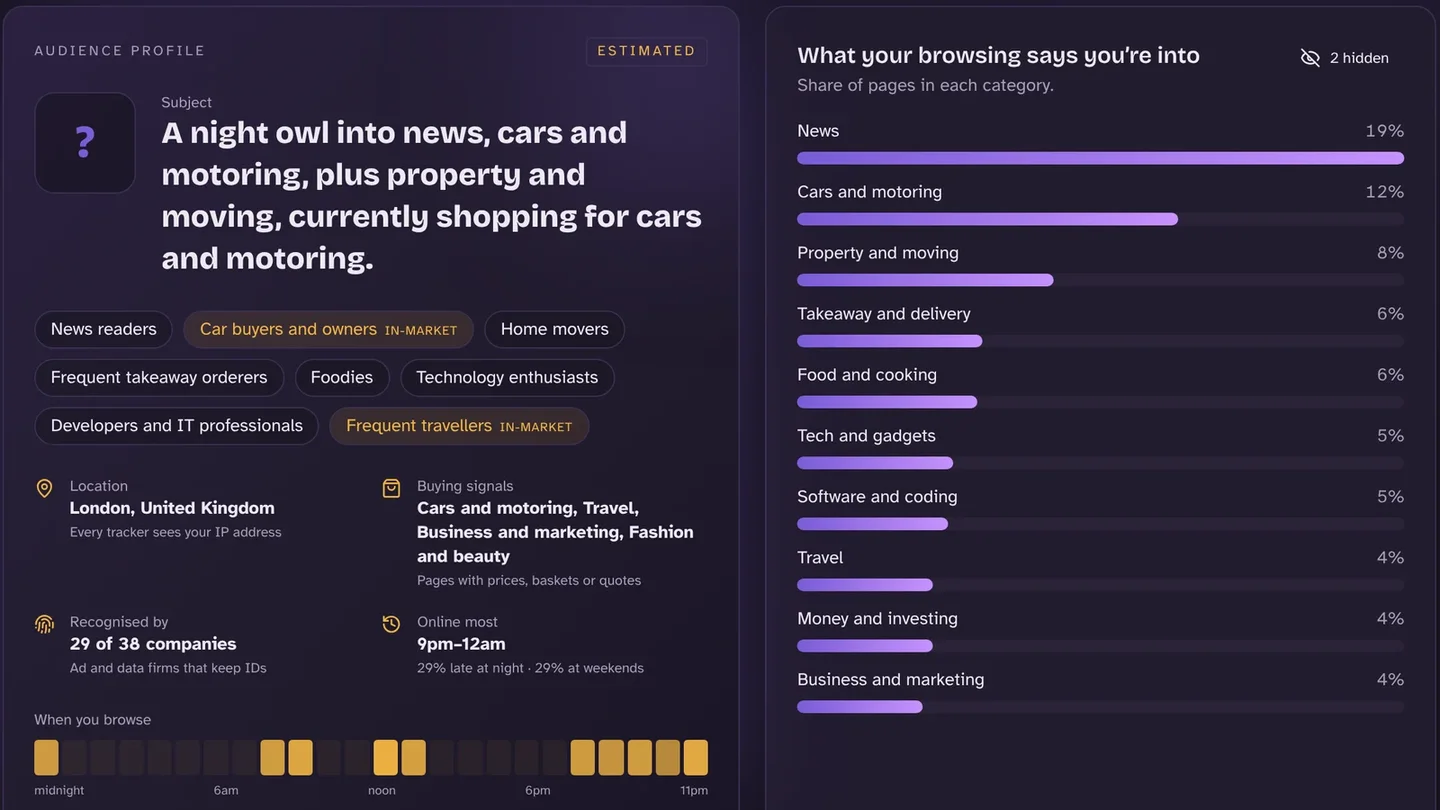
Each recognised visit is a line in a file: which page, when, on which device, from roughly where. A search adds the words you typed. An app adds what you watched or bought. Advertisers do not receive a copy of Chrome’s history list. The pages and apps report the events themselves, tied to an ID.
Google’s My Ad Centre says personalised ads can use activity on sites and apps, YouTube history, and the areas where you have used Google. Its advertising policy adds page context, approximate location, and an email you gave an advertiser who then shared it. With personalised ads off, Google says that stops on Search and YouTube, and that ads can still use general location, browser type and your search terms.
The file is not a biography. It is labels: news late at night, looking at cars, in London. Browser Monster estimates that bundle on your device from pages you open. The screenshot is sample data, the same kind of estimate the extension produces locally.
What happens in the milliseconds when a page loads
Many ads are chosen while the page is still opening. Google’s Authorized Buyers guide says that when a slot is free, the exchange tells bidders about the impression and the user. Each buyer decides whether it knows this ID, what it is worth, and which ad to offer. Google says that round trip happens within a few hundred milliseconds. You see the winner. The others have still received the request, which is why one page contacts many companies. doubleclick.net, adsrvr.org and 3lift.com on the same page are often several firms bidding, or syncing an ID for next time.
A gardening page can draw gardening ads with no profile. The profile is what makes a buyer pay more because this browser looked at a product yesterday. Google’s remarketing example is that shop: it asks Google to reach visitors, and the product follows you onto other sites and into later searches. Google forbids audiences built on sensitive categories such as health or religion. Whether a given site’s tags waited for consent is what the Index records.
How feeds and shopping use the same signals
- Ads. The auction above. The bid is the decision: who is worth this impression, and at what price.
- Feeds. YouTube says recommendations use watch history, search history, subscriptions, likes, dislikes and “not interested”, compared with people who watch similar things. The homepage relies mainly on watch history, and that mix stops when watch history is off and there is no history behind it. YouTube says the system learns from over 80 billion signals a day. Short-video feeds take the same kind of input: what you finish, skip, like and search.
- Shopping. The shop’s own cookie can show you the product again. The same visit can be handed to an ad network, which is the remarketing loop. What is recommended, and how high it sits, follows what you viewed and bought.
Data brokers
A data broker sells the join. LiveRamp, listed in our company data as an identity graph, is the clearest example on the pages we check: online IDs in, a RampID out, available to other firms. On 27 October 2026, 72 of 200 Index sites had loaded at least one known data broker. “Known” means a broker on our list, not every company that could sell data.
This is why a profile can outlive a cookie. Clear the cookie and a RampID, or a hashed email already linked to it, can stitch the next visit back. Opt-outs cover that company’s ID, not the industry. LiveRamp’s is at liveramp.com/opt_out. The Trade Desk’s is at adsrvr.org.
What “Reject all” does and does not stop
Reject is supposed to refuse storage and access that are not strictly necessary, including advertising, and leave things like a basket cookie alone. Two gaps show up in the Index. Trackers that load as the page opens have already seen you: 117 of 200 sites did that before any choice. And the button is not always wired to the tags. We could click reject on 125 sites, and on 55 of those 125 a cross-site company still loaded afterwards.
“Seen after clicking reject” is one homepage visit from London, not a finding that a site broke the law. The methodology is three passes: do nothing, click reject, click accept. The earlier reject guide used the smaller Index of 24 October. These counts are 27 October. The dashboard moves as sites are added.
44%
still loaded a cross-site tracker after reject (55 of 125)
58.5%
loaded cross-site trackers before any choice (117 of 200)
36%
loaded a known data broker (72 of 200)
31.5%
ran a fingerprinting script (63 of 200)
Reject also leaves alone a “legitimate interest” partner list that is already switched on, history inside an account such as YouTube, data and IDs already collected, and fingerprinting that sets no cookie. A paid option instead of a free no had been seen on 17 sites: see “Reject and pay” banners.
Since 5 February 2026 there is a narrower exception besides “strictly necessary”. Schedule A1 to PECR, added by the Data (Use and Access) Act and commenced by SI 2026/82, allows storage or access for statistics about how that service is used, solely to improve it. You must be told, the data must not be shared except to help make those improvements, and you must have a simple free way to object. The schedule says this does not cover information your device emits automatically, so it is not permission to fingerprint you. Advertising is outside the exception. A tag used for ads, or analytics piped into an ad account, still needs consent.
Chrome and third-party cookies in 2026
Chrome has not switched third-party cookies off for everyone. On 22 April 2025 Google said it would keep the existing choice in Privacy and security settings, with no new prompt and no removal. Incognito already blocked them. On 17 October 2025 it confirmed that and retired most Privacy Sandbox tools, including Topics, Protected Audience and IP Protection, for low adoption. CHIPS and FedCM stayed. Chrome’s help page still offers Allow and Block, and says the block is the default only in Incognito. Blocking limits the cross-site cookie. First-party cookies, an email-based ID, fingerprinting and a signed-in account carry on.
Where the setting is
Your rights in the UK
PECR covers storing or reading information on your device, including cookies, pixels and fingerprinting. UK GDPR covers personal data once it is tied to an identifier. Together they give you a real choice on non-essential cookies, a copy of data a company holds (a subject access request), deletion where the erasure right applies, and a complaint to the ICO if a site ignores a refusal. Erasure is not absolute. The ICO’s pages, linked below, set out the cases, and note that some guidance is under review after the Data (Use and Access) Act. The rights bind the organisation that holds the file. They do not rewind a pixel that has already fired.
What actually reduces tracking
- Reject non-essential cookies, then the second screen. Switch off any “legitimate interest” partners. Chrome will not press reject for you; an extension can, and it should press reject rather than accept.
- Block third-party cookies at the path above, or use Incognito for one session.
- Clear the tracking cookies you already have. The cookie-clearing guide covers Chrome, Safari, Edge, Firefox and Android, including clearing by company so you stay signed in.
- Turn off ad personalisation where you have an account. In Google’s My Ad Centre → Manage privacy, switch off activity on sites and apps, YouTube history used for ads, and areas used for ads. That does not delete the history. YouTube’s own page explains turning watch history off. On Android, reset or delete the advertising ID under Settings → Privacy → Ads.
- Use the opt-outs you can name (LiveRamp, The Trade Desk) and send a subject access request, then an erasure request where it applies. Browser Monster can draft a UK or EU letter for a company it has seen. You send it.
- Use private DNS for a different leak. Private DNS hides lookups from your broadband provider. The trackers on the page still run.
Seeing it happen
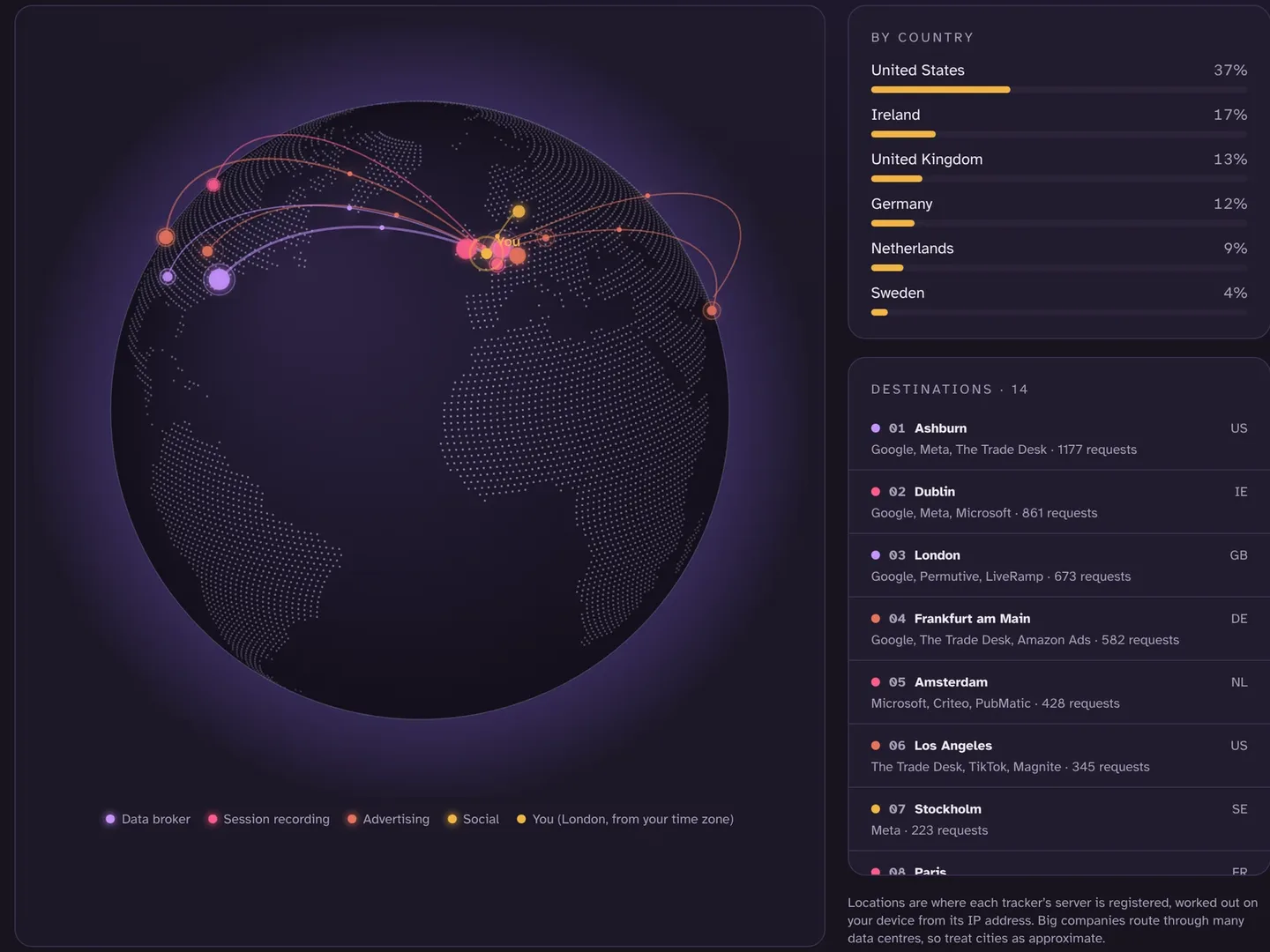
On a page you visit, Browser Monster lists the companies that loaded, flags any that load after you rejected, and keeps a receipt of what the banner said. The map shows which cities the requests went to. The profile is an on-device estimate of the labels those visits support. That estimate is not uploaded to build an advertising profile of you.
For sites you have not opened, the Index checks homepages from London. The rankings order UK news, shopping, banking and other sectors from that data. An unfamiliar domain such as doubleclick.net or rlcdn.com has a page under tracker lookup. The wider trail, including what you post on purpose, is in what a digital footprint is.
Quick answers
How does online tracking work?
A site, app or ad company stores or reads an ID for your browser, records what you do, and joins those records into a profile. Auctions and feeds use that profile, often within a few hundred milliseconds, to decide what to show you.
How do cookies track you?
A cookie is a small file a site stores in your browser so it can recognise you on a later visit. A first-party cookie is set by the site in the address bar. A third-party cookie is set by another company whose content is embedded on the page, so that company can recognise the same browser on other sites that embed it too.
How do websites track you across different sites?
With a third-party cookie, or by syncing IDs so two companies can match the cookies they each hold. LiveRamp’s RampID and The Trade Desk’s Unified ID 2.0 can do it from a hashed email. Fingerprinting can recognise a device with no cookie at all.
Why am I seeing ads for something I searched for?
The site, the search engine or an ad company stored the visit or the search against an ID. When a later page runs an ad auction, a buyer that holds that ID can bid to show you the product again. Google describes this as remarketing: a shop you visited can ask Google to show you ads for what you looked at, on other sites and in later searches.
Does my browsing history affect the ads I see?
It can. Google says personalised ads can use your activity on sites and apps, your YouTube history, and where you have used Google. With that turned off, ads can still use general location, browser type and search terms. Advertisers do not get Chrome’s history list. Pages you visit report themselves.
How do algorithms know what I like?
They mostly know what you did, not what you feel. YouTube says its recommendations lean on watch history, search history, subscriptions, likes, dislikes and “not interested”, and that the homepage relies mainly on watch history. Ad systems use the same kinds of signals, plus IDs that connect activity across sites.
What does clicking “Reject all” actually stop?
It is supposed to refuse cookies and similar tracking that are not strictly necessary, including advertising. It does not undo trackers that already loaded, it does not control a logged-in account’s own history, and it does not stop every tag on every site. On 27 October 2026, cross-site trackers still loaded after reject on 55 of the 125 UK sites where the Browser Monster Index could click reject.
Does Chrome still use third-party cookies?
Yes, in ordinary browsing, unless you block them. In April 2025 Google said Chrome would keep offering that choice in settings and would not add a new prompt or remove third-party cookies. In October 2025 it retired most of the Privacy Sandbox replacements, including Topics. Incognito blocks third-party cookies by default. The setting is Chrome → Settings → Privacy and security → Third-party cookies.
Watch the tracking on the page you are on
Browser Monster shows the companies on each page, where the requests went, and an estimated profile, worked out on your device. It is a mirror, not a blocker.
About these figures
Figures are the public dataset as returned on 27 October 2026. They change as more sites are checked. An observation is not proof a site broke the law. The dataset can be reused for non-commercial purposes under CC BY-NC 4.0. Credit the Browser Monster Index and link to the dashboard.
Sources
- Browser Monster Index · Browser Monster, snapshot 27 October 2026
- How the Browser Monster Index checks websites · Browser Monster
- Cookies · Information Commissioner’s Office
- Cookies and similar technologies · Information Commissioner’s Office
- Data (Use and Access) Act 2025, Schedule 12 (PECR Schedule A1) · legislation.gov.uk, in force 5 February 2026
- The Data (Use and Access) Act 2025 (Commencement No. 6) Regulations 2026, SI 2026/82 · legislation.gov.uk, 5 February 2026
- Data (Use and Access) Act factsheet: PEC Regulations · GOV.UK, 27 June 2025
- Your right of access · Information Commissioner’s Office
- Your right to get your data deleted · Information Commissioner’s Office
- Make a complaint · Information Commissioner’s Office
- Next steps for Privacy Sandbox and tracking protections in Chrome · Google, 22 April 2025
- Update on Plans for Privacy Sandbox Technologies · Google, 17 October 2025
- Delete, allow, and manage cookies in Chrome · Google Chrome Help
- Advertising · Google Privacy & Terms
- Control what data Google uses to show you ads · Google My Ad Centre Help
- How YouTube recommendations work · YouTube Help
- Authorized Buyers overview · Google Authorized Buyers Help